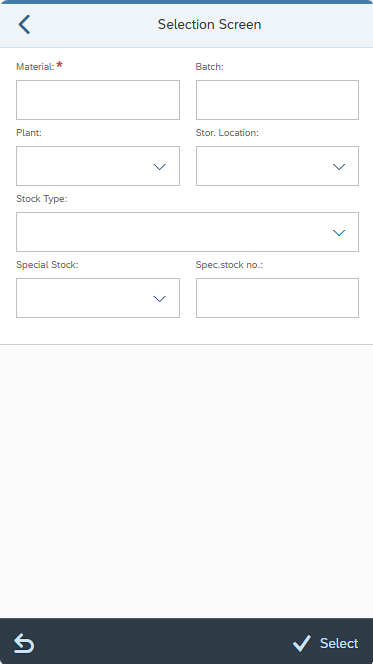
| Configuration elements | Available structures/fields |
|---|---|
| SELECT_OPTS | MATERIAL or MATNR* – SAP material number BATCH or CHARG* – SAP batch number PLANT or WERKS* – plant STGE_LOC or STORE_LOC* or LGORT* – storage location SPEC_STOCK –special stock type SPEC_STOCK_NUMBER - special stock number ST_STATUS or BESTQ* – stock category *technical field names available as of release 5.8.0. |
| SELECT_OPTS_ACTIONS | BACK - back to previous screen. CLEAR_INPUT - clear all input fields. VAR_CHOOSE – select from saved variants. VAR_SAVE – save the selection entries as a variant. VIEW_BASKET – view basket. CONTINUE – proceed to next screen. |
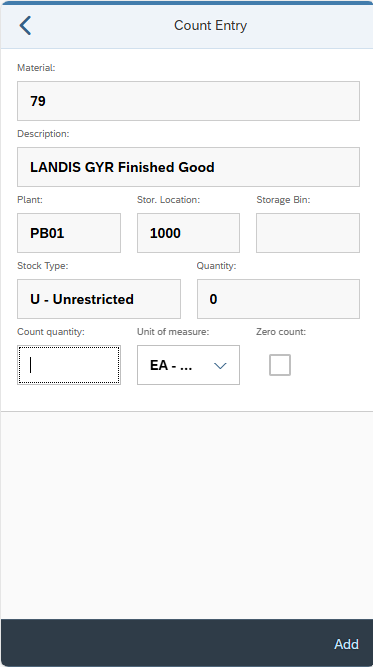
| Configuration elements | Available structures (prefix) |
|---|---|
| INPUT_COUNT | Primary: /TCTM/ISEG (ISEG) Secondary: /TCTM/IKPF (IKPF), /TCTM/MAKT (MAKT), /TCTM/MARA (MARA), /TCTM/MARC (MARC), /TCTM/MARD (MARD) |
| LIST_PI_ITEM_ACTIONS | BACK - back to previous screen. CLEAR_INPUT - clear all input fields. VIEW_BASKET – view basket. ADD_TO_BASKET – enter count. |
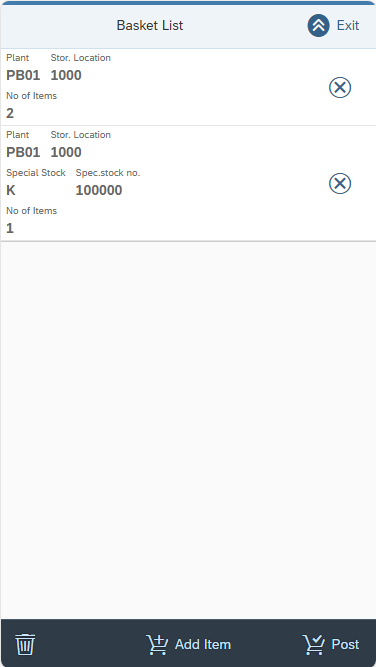
| Configuration element | Available structures (prefix) |
|---|---|
| LIST_BASKET | Primary: /TCTM/IKPF (IKPF) Secondary: None |
| LIST_BASKET_ACTIONS | EXIT - return to selection. EMPTY_BASKET - clear the basket. SAVE - process the basket for posting. ADD_NEW_ITEM - return to lists for next item. DELETE - remove the basket item from basket. |
| LIST_BASKET_HEADER | Primary: /TCTM/IKPF (IKPF) Secondary: None |
| LIST_BASKET_HEADER_EX | n/a |
| LIST_BASKET_SORT | Primary: /TCTM/IKPF |
| LIST_BASKET_ITEM | Primary: /TCTM/ISEG (ISEG) Secondary: /TCTM/IKPF (IKPF), /TCTM/MAKT (MAKT), /TCTM/MARA (MARA), /TCTM/MARC (MARC), /TCTM/MARD (MARD) |
| LIST_BASKET_ITEM_ACTIONS | EXIT - returns to selection. BACK – return to previous screen. DELETE - remove the basket item from basket. |
| LIST_BASKET_ITEM_HEADER | Primary: /TCTM/ISEG (ISEG) Secondary: /TCTM/IKPF (IKPF), /TCTM/MAKT (MAKT), /TCTM/MARA (MARA), /TCTM/MARC (MARC), /TCTM/MARD (MARD) |
| LIST_BASKET_ITEM_HEADER_EX | n/a |
| LIST_BASKET_ITEM_SORT | Primary: /TCTM/ISEG |
| Configuration element | Description |
|---|---|
| FE_APP | Frontend class to use in running the transaction. Reference to the platform specific frontend application that should be used to run the transaction. Included in the App Master Data file supplied for setting up the initial transactions. |
| MODE | Configure should be for IM stock. |
| ADHOC_MULTI | Activate toggle to activate this multi-item feature. |
| MATERIAL_SEARCH_SEQ | Defines the search sequence for materials and the relevant conversion exits. Valid Values: M – Material D – Description E – EAN code (the EAN code for any unit of measure in the material master) B – Storage Bin (Plant/Data Stor 1 view of material master) |
| SERIAL_OVERRIDE | Serialisation Overrides. For more information, go here. |
| SH_PARAMS_1 | Search Help Parameter Map. |
| CALL_TRANSACTION | Defines transactions that can be called from this app automatically. Add a call to a serial number app transaction if you want to jump to serial number input after the quantity has been entered. |
| SUPPRESS_SUCCESS | Allows success messages to be suppressed. If toggle = ON, success messages are suppressed. If toggle = OFF, success messages are not suppressed. |
| CONFIRM_COUNT | Configure whether there is a pop-up message to confirm the count. X - Always D – Differences only Blank – Never |
| PROMPT_ADD | Determines whether extra count quantity can be added to an item already in the basket.
|
| REPLACE_ADD | Determines whether the entered count quantity can completely replace an item already in the basket.
|
| SUMMARISE_BASKET_ITEM | Configuration option to allow different ways of updating the basket, where the item has previously been processed and the item details are the same: If set to blank, you will receive an error message if item is already in the basket. You need to remove the existing item before the new one can be added. If set to A, then the quantity in the basket for the matching item will be increased by the quantity entered. If set to B, then a new basket entry will be created, resulting in multiple basket entries for the item. |
| PLANT_FILTER | Enables filtering of plants assigned to the warehouse, allowing you to include or exclude specific values in the list view. |
| SLOC_FILTER | This is a possible filter element that can be used, as required, to allow filtering of the storage locations (if these need to be restricted to a subset of locations that are allocated to the PreBilt warehouse). It has been created as an example and can be used or changed as required. It must be used in conjunction with a suitable field class assigned to the field. |
| UOM_FILTER | Enables filtering of unit of measure, allowing the user to include or exclude specific values in the list view. |
| STATUS_FILTER | Allows filtering of stock type in IM or stock category in WM. |
| SPEC_STOCK_LIST | Allows creation of a custom list of allowed special stock types that can be displayed in a dropdown. |
| ST_STATUS_LIST | Allows creation of a custom list of allowed stock categories / types that can be displayed in a dropdown. e.g., unrestricted, blocked, quality, returns. |
| APP_TEXTS | Defines standard app text to be used in screen headers, buttons etc. |
| TRANS_INFO | Information about the transaction. |