> For the complete documentation index, see [llms.txt](https://docs.theconfigteam.com/llms.txt). Markdown versions of documentation pages are available by appending `.md` to page URLs; this page is available as [Markdown](https://docs.theconfigteam.com/prebilt-for-im-wm-strm/im-multi-bin-management/im-multi-bin-bin-to-bin-putaway/configuration.md).

# Configuration

{% hint style="info" %}
**Note**

This configuration guide refers to PreBilt transactions beginning '*PB2\_*' and details the standard process without additional features or enhancements. You should [copy these transactions](/prebilt-for-im-wm-strm/configuration-guide/transaction-codes.md#create-a-transaction) with a different prefix to maintain a backup and protect the originals.

The guide displays the standard PreBilt screens and gives details of the structures in which the on screen fields can be found. Fields within these structures can be used to customise and enhance the screen. For instructions on how to use structures to find fields, please see [Available data structures](/prebilt-for-im-wm-strm/app-master-data/screen-framework/features/available-data-structures.md). For instructions on how to maintain the configuration elements in AMD, please see [General configuration elements](/prebilt-for-im-wm-strm/app-master-data/general-configuration-elements.md).
{% endhint %}

The configuration elements of transactions *PB2\_IM\_BIN\_TO\_BIN* and *PB2\_IM\_PUTAWAY* are the same.

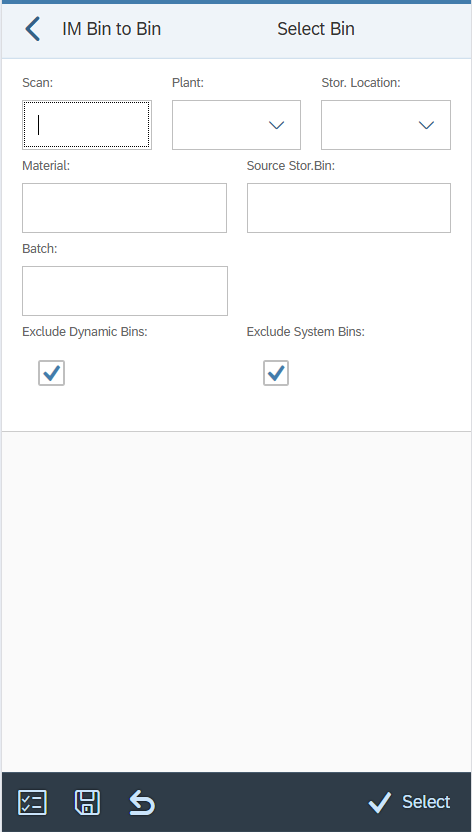
## Selection options

<div><figure><img src="https://3149936122-files.gitbook.io/~/files/v0/b/gitbook-x-prod.appspot.com/o/spaces%2F2CkvzIq48sLzTY4bfcWl%2Fuploads%2FO7StGFGCIV0s2pkdzVBm%2Fimage.png?alt=media&amp;token=0e8b8595-d8a4-4c85-b3a8-630573073f62" alt="" width="236"><figcaption><p>PB2_IM_BIN_TO_BIN selection</p></figcaption></figure> <figure><img src="https://3149936122-files.gitbook.io/~/files/v0/b/gitbook-x-prod.appspot.com/o/spaces%2F2CkvzIq48sLzTY4bfcWl%2Fuploads%2FRoH1vIe7ChsXIHh80btf%2Fimage.png?alt=media&amp;token=9bf0a5d4-f0a5-469e-8479-862d5993b1d2" alt="" width="236"><figcaption><p>PB2_IM_PUTAWAY selection</p></figcaption></figure></div>

<table><thead><tr><th width="242">Configuration element</th><th width="502">Available structures</th></tr></thead><tbody><tr><td>SELECT_OPTS</td><td>Primary: None<br>Secondary: None</td></tr><tr><td>SELECT_OPTS_ACTIONS</td><td>Primary: None<br>Secondary: None</td></tr></tbody></table>

## Bin stock list

<div><figure><img src="https://3149936122-files.gitbook.io/~/files/v0/b/gitbook-x-prod.appspot.com/o/spaces%2F2CkvzIq48sLzTY4bfcWl%2Fuploads%2FYTn1vquLOsSaTh0Ysyv7%2Fimage.png?alt=media&amp;token=33d6e49b-a64b-4a7a-8843-4a236e6a7d8f" alt="" width="237"><figcaption><p>PB2_IM_BIN_TO_BIN bin stock list</p></figcaption></figure> <figure><img src="https://3149936122-files.gitbook.io/~/files/v0/b/gitbook-x-prod.appspot.com/o/spaces%2F2CkvzIq48sLzTY4bfcWl%2Fuploads%2FvbER3TIqRMjTVzEvcXCJ%2Fimage.png?alt=media&amp;token=5f30431a-61da-404f-8cab-b88b9cdb2b52" alt="" width="236"><figcaption><p>PB2_IM_PUTAWAY bin stock list</p></figcaption></figure></div>

<table><thead><tr><th width="242">Configuration element</th><th width="502">Available structures</th></tr></thead><tbody><tr><td>LIST_BIN_STOCK</td><td>Primary: /TCTM/IMB_LQUA<br>Secondary: /TCTM/IMB_LAGP, /TCTM/IMB_LQUA, /TCTM/MAKT, /TCTM/MARA, /TCTM/MARC, /TCTM/MARD, /TCTM/MLGN</td></tr><tr><td>LIST_BIN_STOCK_ACTIONS</td><td>Primary: None<br>Secondary: None</td></tr><tr><td>LIST_BIN_STOCK_HEADER</td><td>Primary: /TCTM/IMB_LQUA<br>Secondary: /TCTM/IMB_LAGP, /TCTM/IMB_LQUA, /TCTM/MAKT, /TCTM/MARA, /TCTM/MARC, /TCTM/MARD, /TCTM/MLGN</td></tr><tr><td>LIST_BIN_STOCK_HEADER_EX</td><td>Primary: None<br>Secondary: None</td></tr><tr><td>LIST_BIN_STOCK_SORT</td><td>Primary: None<br>Secondary: None</td></tr></tbody></table>

## Destination input

<div><figure><img src="https://3149936122-files.gitbook.io/~/files/v0/b/gitbook-x-prod.appspot.com/o/spaces%2F2CkvzIq48sLzTY4bfcWl%2Fuploads%2FPCz4ZsNutdO5Z0B6JDSu%2Fimage.png?alt=media&amp;token=4c5de2d8-4958-4611-abcb-7d067e507bdf" alt="" width="237"><figcaption><p>PB2_IM_BIN_TO_BIN destination input</p></figcaption></figure> <figure><img src="https://3149936122-files.gitbook.io/~/files/v0/b/gitbook-x-prod.appspot.com/o/spaces%2F2CkvzIq48sLzTY4bfcWl%2Fuploads%2FGXHeiN36Oasdbg18n92J%2Fimage.png?alt=media&amp;token=bfe3e651-bf24-4f03-9721-4baff7ad1fe7" alt="" width="236"><figcaption><p>PB2_IM_PUTAWAY destination input</p></figcaption></figure></div>

<table><thead><tr><th width="242">Configuration element</th><th width="502">Available structures</th></tr></thead><tbody><tr><td>INPUT_DESTINATION</td><td>Primary: /TCTM/IMB_LQUA<br>Secondary: /TCTM/IMB_LAGP, /TCTM/IMB_LQUA, /TCTM/MAKT, /TCTM/MARA, /TCTM/MARC, /TCTM/MARD, /TCTM/MLGN</td></tr><tr><td>INPUT_DESTINATION_ACTIONS</td><td>Primary: None<br>Secondary: None</td></tr></tbody></table>

## General configuration elements

<table><thead><tr><th width="242">Configuration element</th><th width="502">Available structures</th></tr></thead><tbody><tr><td>FE_APP</td><td>Frontend class to use in running the transaction.<br><br>Reference to the platform specific frontend application that should be used to run the transaction. Included in the App Master Data file supplied for setting up the initial transactions.</td></tr><tr><td>ALLOW_MOVE</td><td>Allows the movement of stock.<br><br>If toggle = ON, stock movement Is allowed.<br><br>If toggle = OFF, stock movement is not allowed.</td></tr><tr><td>EMPTY_BIN_TEXT</td><td>Identifier for empty bins. If active, empty bin values will display the bin and the corresponding empty bin value with “-“ delimiter and with the empty bin text string.<br><br>E.g. for bin 01-01-01 if empty would display as “01-01-01 – Empty Bin”</td></tr><tr><td>SUPPRESS_SUCCESS</td><td>Allows success messages to be suppressed.<br> <br>If toggle = ON, success messages are suppressed.<br> <br>If toggle = OFF, success messages are not suppressed.</td></tr><tr><td>PLANT_FILTER</td><td>Enables filtering of plants assigned to the warehouse, allowing you to include or exclude specific values in the list view.</td></tr><tr><td>SLOC_FILTER</td><td>This is a possible filter element that can be used, as required, to allow filtering of the storage locations (if these need to be restricted to a subset of locations that are allocated to the PreBilt warehouse). It has been created as an example and can be used or changed as required.<br><br>It must be used in conjunction with a suitable field class assigned to the field.</td></tr><tr><td>DOC_TYPE_FILTER</td><td>Enables filtering of document type, allowing you to include or exclude specific values in the list view. (PB2_IM_PUTAWAY only.)</td></tr><tr><td>APP_TEXTS</td><td>Defines standard app text to be used in screen headers, buttons etc.</td></tr><tr><td>TRANS_INFO</td><td>Information about the transaction.</td></tr></tbody></table>
