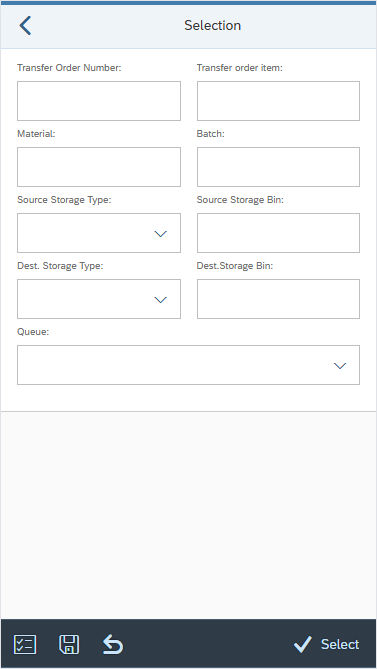
| Configuration element | Available structures |
|---|---|
| SELECT_OPTS | Primary: None Secondary: None |
| SELECT_OPTS_ACTIONS | Primary: None Secondary: None |
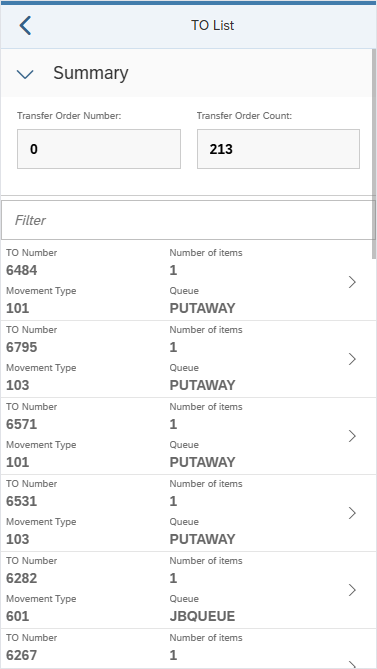
| Configuration element | Available structures |
|---|---|
| LIST_TO | Primary: None Secondary: None |
| LIST_TO_ACTIONS | Primary: None Secondary: None |
| LIST_TO_HEADER | Primary: None Secondary: None |
| LIST_TO_HEADER_EX | Primary: None Secondary: None |
| LIST_TO_SORT | Primary: None Secondary: None |
| LIST_TO_ITEM | Primary: None Secondary: None |
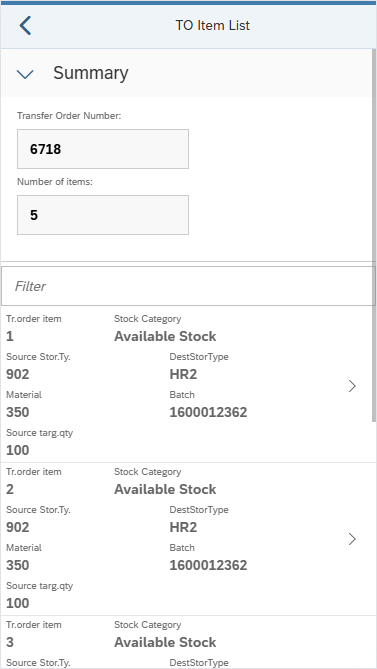
| Configuration element | Available structures |
|---|---|
| LIST_TO_ITEM | Primary: None Secondary: None |
| LIST_TO_ITEM_ACTIONS | Primary: None Secondary: None |
| LIST_TO_ITEM_HEADER | Primary: None Secondary: None |
| LIST_TO_ITEM_HEADER_EX | Primary: None Secondary: None |
| LIST_TO_ITEM_SORT | Primary: None Secondary: None |
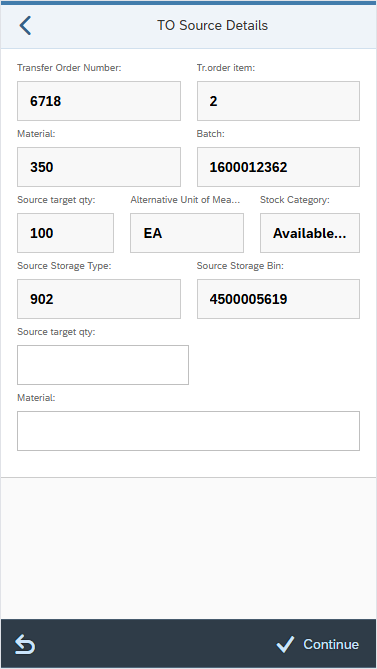
| Configuration element | Available structures |
|---|---|
| INPUT_SOURCE_DETAIL | Primary: None Secondary: None |
| INPUT_SOURCE_ACTIONS | Primary: None Secondary: None |
| Configuration element | Available structures |
|---|---|
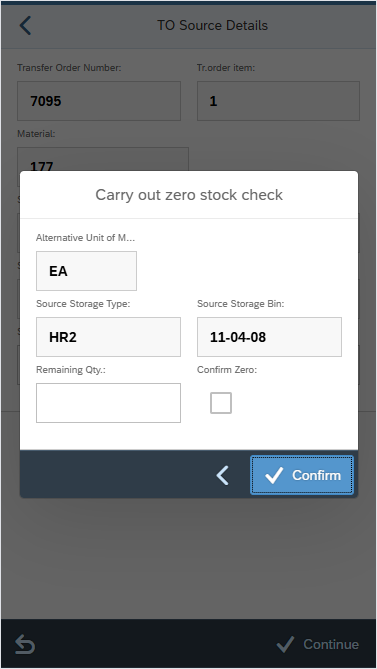
| INPUT_ZERO_STOCK | Primary: None Secondary: None |
| INPUT_ZERO_STOCK_ACTIONS | Primary: None Secondary: None |
| Configuration element | Available structures |
|---|---|
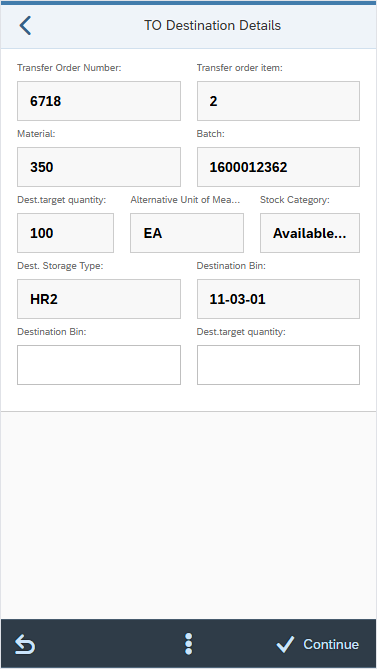
| INPUT_DEST_DETAIL | Primary: None Secondary: None |
| INPUT_DEST_ACTIONS | Primary: None Secondary: None |
| Configuration element | Description |
|---|---|
| FE_APP | Frontend class to use in running the transaction. Reference to the platform specific frontend application that should be used to run the transaction. Included in the App Master Data file supplied for setting up the initial transactions. |
| ALLOW_CONFIRM_TO | Allows transfer order confirmation. If toggle = ON, the app will allow confirmation of transfer orders that are already created, or created via the app. If toggle = OFF, if searching for transfer orders to confirm, the app will not be able to determine a processing mode. If creating a new transfer order, the app will not allow direct confirmation of that transfer order. |
| MATERIAL_SEARCH_SEQ | Defines the search sequence for materials and the relevant conversion exits. Valid Values: M – Material D – Description E – EAN code (the EAN code for any unit of measure in the material master) B – Storage Bin (Plant/Data Stor 1 view of material master) |
| SUPPRESS_SUCCESS | Allows success messages to be suppressed. If toggle = ON, success messages are suppressed. If toggle = OFF, success messages are not suppressed. |
| LOCK_LEVEL | Configure app to lock delivery data during processing at either the header level or item level. Valid values: ‘HEADER’ will lock the delivery when selecting directly from the selection screen, or from the ‘List OBD’ screen. ‘ITEM’ will lock the delivery item when selecting an item from the delivery list, this will enable multiple users to pick the same delivery simultaneously. |
| UOM_CONVERSION | You can identify and setup the quantity and the UOM fields that should be converted to the alternative UOM. |
| UOM_SEQ | You can create an app transaction specific sequence of UOM types that is different from the global default. |
| ALLOW_SINGLE_LIST | Allows the app to return to a list screen when the penultimate item on that list screen is processed so that the user can then select the last items from the list rather than the last items being automatically selected. It applies to both header or item lists. |
| SYS_GUIDE_TO | If set to blank, the user selects a transfer order from the TO List. The next screen is either the TO Item List (if multiple open items) or the confirmation screen (if only one). After confirming an item, the user returns to the TO List, even if more items remain. If set to A, the same list is generated, but the top transfer order (based on LIST_TO_SORT) is auto-selected and passed to the next screen. The list screen is skipped. If set to B, all transfer orders are auto-selected and passed to the next screen. The list screen is skipped, and sort order does not apply. If set to C, the user selects a transfer order like with blank. If it has multiple items, the app cycles through all items until the transfer order is fully confirmed, then returns to the list. |
| SYS_GUIDE_TO_ITEM | Determines the flow logic of the app. If toggle = ON, the same list of transfer order items is generated as if the value was toggle = OFF, but the user will not be presented with the list screen. Instead, the top transfer order item from the list will be automatically selected and passed to the next screen. The sort of the list, and therefore the way to control which transfer order item is selected for the user, is determined by the sort order defined in LIST_TO_ITEM_SORT. If toggle = OFF, the LIST_TO_ITEM screen is displayed, and the user selects a transfer order item to count from the item list. |
| PLANT_FILTER | Enables filtering of plants assigned to the warehouse, allowing you to include or exclude specific values in the list view. |
| SLOC_FILTER | This is a possible filter element that can be used, as required, to allow filtering of the storage locations (if these need to be restricted to a subset of locations that are allocated to the PreBilt warehouse). It has been created as an example and can be used or changed as required. It must be used in conjunction with a suitable field class assigned to the field. |
| STYPE_FILTER | Enables filtering of storage types, allowing the user to include or exclude specific values in the list view. |
| QUEUE_FILTER | Enables filtering of queues assigned to the warehouse, allowing the user to include or exclude specific values in the list view. |
| ST_BIN_FILTER | Enables filtering of storage bins, allowing the user to include or exclude specific values in the list view. |
| APP_TEXTS | Defines standard app text to be used in screen headers, buttons etc. |
| TRANS_INFO | Information about the transaction. |
| Configuration element | Available structures |
|---|---|
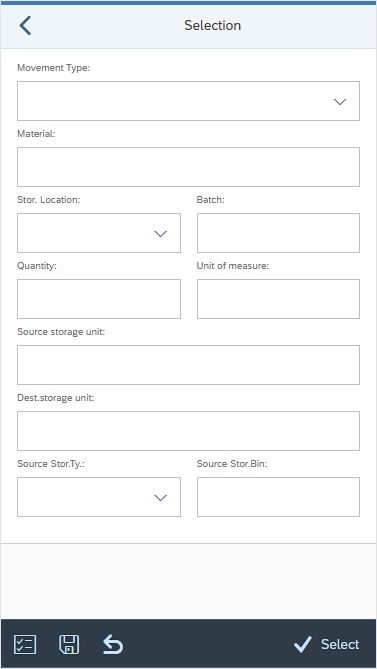
| SELECT_OPTS | Primary: None Secondary: None |
| SELECT_OPTS_ACTIONS | Primary: None Secondary: None |
| Configuration element | Available structures |
|---|---|
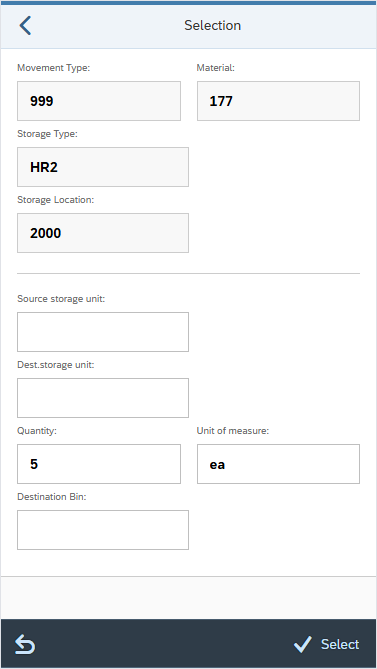
| INPUT_QUANT_DEST_DETAIL | Primary: None Secondary: LQUA |
| INPUT_QUANT_DEST_ACTIONS | Primary: None Secondary: None |

| Configuration element | Available structures |
|---|---|
| INPUT_ZERO_STOCK | Primary: None Secondary: None |
| INPUT_ZERO_STOCK_ACTIONS | Primary: None Secondary: None |

| Configuration element | Available structures |
|---|---|
| INPUT_DEST_DETAIL | Primary: None Secondary: None |
| INPUT_DEST_ACTIONS | Primary: None Secondary: None |
| Configuration element | Description |
|---|---|
| FE_APP | Frontend class to use in running the transaction. Reference to the platform specific frontend application that should be used to run the transaction. Included in the App Master Data file supplied for setting up the initial transactions. |
| CREATE_MODE | Allows transfer orders to be created for different types of stock in the warehouse - quants, storage units or handling units. For storage units, CREATE_MODE = QUANT. |
| ALLOW_CREATE_TO | Allows transfer order creation. If toggle = ON, the app will allow creation of transfer orders. If toggle = OFF, if trying to create a transfer order, the app will not be able to determine a processing mode. |
| SUPPRESS_SUCCESS | Allows success messages to be suppressed. If toggle = ON, success messages are suppressed. If toggle = OFF, success messages are not suppressed. |
| LOCK_LEVEL | Configure app to lock delivery data during processing at either the header level or item level. Valid values: ‘HEADER’ will lock the delivery when selecting directly from the selection screen, or from the ‘List OBD’ screen. ‘ITEM’ will lock the delivery item when selecting an item from the delivery list, this will enable multiple users to pick the same delivery simultaneously. |
| PLANT_FILTER | Enables filtering of plants assigned to the warehouse, allowing you to include or exclude specific values in the list view. |
| SLOC_FILTER | This is a possible filter element that can be used, as required, to allow filtering of the storage locations (if these need to be restricted to a subset of locations that are allocated to the PreBilt warehouse). It has been created as an example and can be used or changed as required. It must be used in conjunction with a suitable field class assigned to the field. |
| APP_TEXTS | Defines standard app text to be used in screen headers, buttons etc. |
| TRANS_INFO | Information about the transaction. |
| Configuration element | Available structures |
|---|---|
| SELECT_OPTS | Primary: None Secondary: None |
| SELECT_OPTS_ACTIONS | Primary: None Secondary: None |

| Configuration element | Available structures |
|---|---|
| INPUT_QUANT_DEST_DETAIL | Primary: None Secondary: None |
| INPUT_QUANT_DEST_ACTIONS | Primary: None Secondary: None |

| Configuration element | Available structures |
|---|---|
| INPUT_ZERO_STOCK | Primary: None Secondary: None |
| INPUT_ZERO_STOCK_ACTIONS | Primary: None Secondary: None |

| Configuration element | Available structures |
|---|---|
| INPUT_SOURCE_DETAIL | Primary: None Secondary: None |
| INPUT_SOURCE_ACTIONS | Primary: None Secondary: None |

| Configuration element | Available structures |
|---|---|
| INPUT_DEST_DETAIL | Primary: None Secondary: None |
| INPUT_DEST_ACTIONS | Primary: None Secondary: None |
| Configuration element | Available structures |
|---|---|
| FE_APP | Frontend class to use in running the transaction. Reference to the platform specific frontend application that should be used to run the transaction. Included in the App Master Data file supplied for setting up the initial transactions. |
| CREATE_MODE | Allows transfer orders to be created for different types of stock in the warehouse - quants, storage units or handling units. For storage units, CREATE_MODE = QUANT. |
| SUPPRESS_SUCCESS | Allows success messages to be suppressed. If toggle = ON, success messages are suppressed. If toggle = OFF, success messages are not suppressed. |
| LOCK_LEVEL | Configure app to lock delivery data during processing at either the header level or item level. Valid values: ‘HEADER’ will lock the delivery when selecting directly from the selection screen, or from the ‘List OBD’ screen. ‘ITEM’ will lock the delivery item when selecting an item from the delivery list, this will enable multiple users to pick the same delivery simultaneously. |
| ALLOW_CREATE_TO | Allows transfer order creation. If toggle = ON, the app will allow creation of transfer orders. If toggle = OFF, if trying to create a transfer order, the app will not be able to determine a processing mode. |
| ALLOW_CANCEL_TO | Allow cancellation of a TO. If toggle = ON a TO can be cancelled. If toggle = OFF a TO cannot be cancelled. |
| ALLOW_CONFIRM_TO | Allows transfer order confirmation. If toggle = ON, the app will allow confirmation of transfer orders that are already created, or created via the app. If toggle = OFF, if searching for transfer orders to confirm, the app will not be able to determine a processing mode. If creating a new transfer order, the app will not allow direct confirmation of that transfer order. |
| UOM_CONVERSION | You can identify and setup the quantity and the UOM fields that should be converted to the alternative UOM. |
| UOM_SEQ | You can create an app transaction specific sequence of UOM types that is different from the global default. |
| PLANT_FILTER | Enables filtering of plants assigned to the warehouse, allowing you to include or exclude specific values in the list view. |
| SLOC_FILTER | This is a possible filter element that can be used, as required, to allow filtering of the storage locations (if these need to be restricted to a subset of locations that are allocated to the PreBilt warehouse). It has been created as an example and can be used or changed as required. It must be used in conjunction with a suitable field class assigned to the field. |
| APP_TEXTS | Defines standard app text to be used in screen headers, buttons etc. |
| TRANS_INFO | Information about the transaction. |
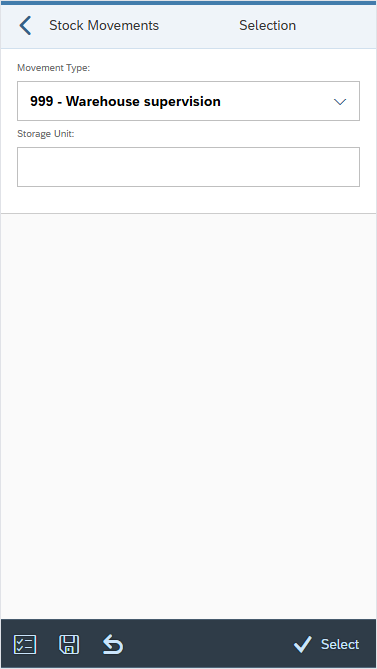
| Configuration element | Available structures |
|---|---|
| SELECT_OPTS | Primary: None Secondary: None |
| SELECT_OPTS_ACTIONS | Primary: None Secondary: None |
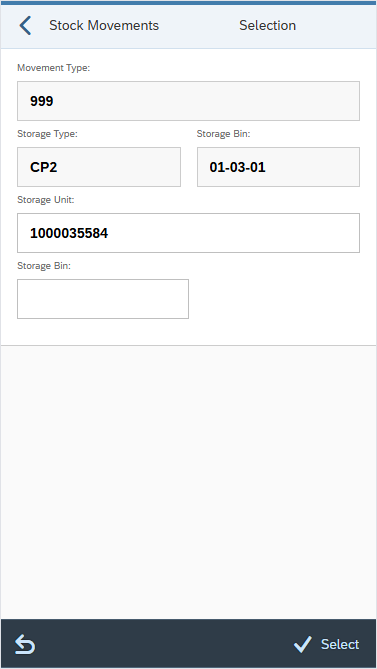
| Configuration element | Available structures |
|---|---|
| INPUT_SU_BIN_DETAIL | Primary: None Secondary: LEIN |
| INPUT_SU_BIN_ACTIONS | Primary: None Secondary: None |

| Configuration element | Available structures |
|---|---|
| INPUT_ZERO_STOCK | Primary: None Secondary: None |
| INPUT_ZERO_STOCK_ACTIONS | Primary: None Secondary: None |
| Configuration element | Description |
|---|---|
| FE_APP | Frontend class to use in running the transaction. Reference to the platform specific frontend application that should be used to run the transaction. Included in the App Master Data file supplied for setting up the initial transactions. |
| CREATE_MODE | Allows transfer orders to be created for different types of stock in the warehouse - quants, storage units or handling units. For storage units, CREATE_MODE = QUANT. |
| ALLOW_CREATE_TO | Allows transfer order creation. If toggle = ON, the app will allow creation of transfer orders. If toggle = OFF, if trying to create a transfer order, the app will not be able to determine a processing mode. |
| SUPPRESS_SUCCESS | Allows success messages to be suppressed. If toggle = ON, success messages are suppressed. If toggle = OFF, success messages are not suppressed. |
| LOCK_LEVEL | Configure app to lock delivery data during processing at either the header level or item level. Valid values: ‘HEADER’ will lock the delivery when selecting directly from the selection screen, or from the ‘List OBD’ screen. ‘ITEM’ will lock the delivery item when selecting an item from the delivery list, this will enable multiple users to pick the same delivery simultaneously. |
| PLANT_FILTER | Enables filtering of plants assigned to the warehouse, allowing you to include or exclude specific values in the list view. |
| SLOC_FILTER | This is a possible filter element that can be used, as required, to allow filtering of the storage locations (if these need to be restricted to a subset of locations that are allocated to the PreBilt warehouse). It has been created as an example and can be used or changed as required. It must be used in conjunction with a suitable field class assigned to the field. |
| APP_TEXTS | Defines standard app text to be used in screen headers, buttons etc. |
| TRANS_INFO | Information about the transaction. |
| Configuration element | Available structures |
|---|---|
| SELECT_OPTS | Primary: None Secondary: None |
| SELECT_OPTS_ACTIONS | Primary: None Secondary: None |

| Configuration element | Available structures |
|---|---|
| INPUT_ZERO_STOCK | Primary: None Secondary: None |
| INPUT_ZERO_STOCK_ACTIONS | Primary: None Secondary: None |

| Configuration element | Available structures |
|---|---|
| INPUT_SU_BIN_DETAIL | Primary: None Secondary: None |
| INPUT_SU_BIN_ACTIONS | Primary: None Secondary: None |

| Configuration element | Available structures |
|---|---|
| INPUT_DEST_DETAIL | Primary: None Secondary: None |
| INPUT_DEST_ACTIONS | Primary: None Secondary: None |
| Configuration element | Available structures |
|---|---|
| FE_APP | Frontend class to use in running the transaction. Reference to the platform specific frontend application that should be used to run the transaction. Included in the App Master Data file supplied for setting up the initial transactions. |
| CREATE_MODE | Allows transfer orders to be created for different types of stock in the warehouse - quants, storage units or handling units. For storage units, CREATE_MODE = QUANT. |
| CREATE_SU_CONF_OPEN_TO | During creation of a transfer order for a storage unit or handling unit; if open transfer orders are found for the selected storage unit or handling unit, the user can choose whether to confirm the open transfer order. The option is set with a source and destination storage type, so that the app will only allow confirmation of open transfers for the storage unit or handling unit between specific storage types. ALLOW_CONFIRM_TO must have toggle = ON. If toggle = OFF, the open TO cannot be confirmed. |
| SUPPRESS_SUCCESS | Allows success messages to be suppressed. If toggle = ON, success messages are suppressed. If toggle = OFF, success messages are not suppressed. |
| LOCK_LEVEL | Configure app to lock delivery data during processing at either the header level or item level. Valid values: ‘HEADER’ will lock the delivery when selecting directly from the selection screen, or from the ‘List OBD’ screen. ‘ITEM’ will lock the delivery item when selecting an item from the delivery list, this will enable multiple users to pick the same delivery simultaneously. |
| ALLOW_CREATE_TO | Allows transfer order creation. If toggle = ON, the app will allow creation of transfer orders. If toggle = OFF, if trying to create a transfer order, the app will not be able to determine a processing mode. |
| ALLOW_CANCEL_TO | Allow cancellation of a TO. If toggle = ON a TO can be cancelled. If toggle = OFF a TO cannot be cancelled. |
| ALLOW_CONFIRM_TO | Allows transfer order confirmation. If toggle = ON, the app will allow confirmation of transfer orders that are already created, or created via the app. If toggle = OFF, if searching for transfer orders to confirm, the app will not be able to determine a processing mode. If creating a new transfer order, the app will not allow direct confirmation of that transfer order. |
| UOM_CONVERSION | You can identify and setup the quantity and the UOM fields that should be converted to the alternative UOM. |
| UOM_SEQ | You can create an app transaction specific sequence of UOM types that is different from the global default. |
| APP_TEXTS | Defines standard app text to be used in screen headers, buttons etc. |
| TRANS_INFO | Information about the transaction. |

| Configuration element | Available structures |
|---|---|
| SELECT_OPTS | Primary: None Secondary: None |
| SELECT_OPTS_ACTIONS | Primary: None Secondary: None |

| Configuration element | Available structures |
|---|---|
| LIST_TO | Primary: None Secondary: None |
| LIST_TO_ACTIONS | Primary: None Secondary: None |
| LIST_TO_HEADER | Primary: None Secondary: None |
| LIST_TO_HEADER_EX | Primary: None Secondary: None |
| LIST_TO_SORT | Primary: None Secondary: None |

| Configuration element | Available structures |
|---|---|
| LIST_TO_ITEM | Primary: None Secondary: None |
| LIST_TO_ITEM_ACTIONS | Primary: None Secondary: None |
| LIST_TO_ITEM_HEADER | Primary: None Secondary: None |
| LIST_TO_ITEM_HEADER_EX | Primary: None Secondary: None |
| LIST_TO_ITEM_SORT | Primary: None Secondary: None |
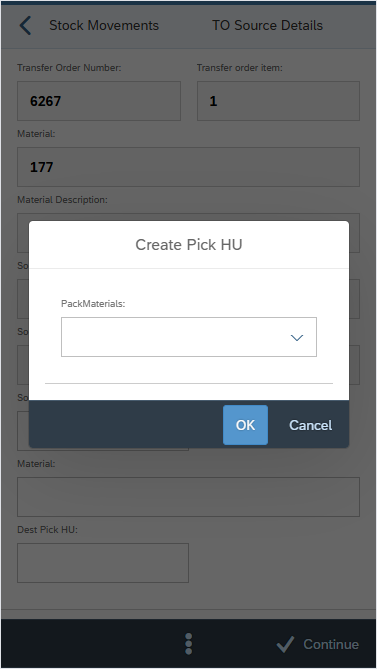
| Configuration element | Available structures |
|---|---|
| INPUT_PICK_HU_CREATE | Primary: None Secondary: None |
| INPUT_PICK_HU_CREATE_ACTIONS | Primary: None Secondary: None |

| Configuration element | Available structures |
|---|---|
| INPUT_SOURCE_DETAIL | Primary: None Secondary: None |
| INPUT_SOURCE_ACTIONS | Primary: None Secondary: None |

| Configuration element | Available structures |
|---|---|
| INPUT_ZERO_STOCK | Primary: None Secondary: None |
| INPUT_ZERO_STOCK_ACTIONS | Primary: None Secondary: None |

| Configuration element | Available structures |
|---|---|
| INPUT_DEST_DETAIL | Primary: None Secondary: None |
| INPUT_DEST_ACTIONS | Primary: None Secondary: None |
| Configuration element | Available structures |
|---|---|
| FE_APP | Frontend class to use in running the transaction. Reference to the platform specific frontend application that should be used to run the transaction. Included in the App Master Data file supplied for setting up the initial transactions. |
| ALLOW_CONFIRM_TO | Allows transfer order confirmation. If toggle = ON, the app will allow confirmation of transfer orders that are already created, or created via the app. If toggle = OFF, if searching for transfer orders to confirm, the app will not be able to determine a processing mode. If creating a new transfer order, the app will not allow direct confirmation of that transfer order. |
| MATERIAL_SEARCH_SEQ | Defines the search sequence for materials and the relevant conversion exits. Valid Values: M – Material D – Description E – EAN code (the EAN code for any unit of measure in the material master) B – Storage Bin (Plant/Data Stor 1 view of material master) |
| SUPPRESS_SUCCESS | Allows success messages to be suppressed. If toggle = ON, success messages are suppressed. If toggle = OFF, success messages are not suppressed. |
| LOCK_LEVEL | Configure app to lock delivery data during processing at either the header level or item level. Valid values: ‘HEADER’ will lock the delivery when selecting directly from the selection screen, or from the ‘List OBD’ screen. ‘ITEM’ will lock the delivery item when selecting an item from the delivery list, this will enable multiple users to pick the same delivery simultaneously. |
| ALLOW_SINGLE_LIST | Allows the app to return to a list screen when the penultimate item on that list screen is processed so that the user can then select the last items from the list rather than the last items being automatically selected. It applies to both header or item lists. |
| SYS_GUIDE_TO | If set to blank, the user selects a transfer order from the TO List. The next screen is either the TO Item List (if multiple open items) or the confirmation screen (if only one). After confirming an item, the user returns to the TO List, even if more items remain. If set to A, the same list is generated, but the top transfer order (based on LIST_TO_SORT) is auto-selected and passed to the next screen. The list screen is skipped. If set to B, all transfer orders are auto-selected and passed to the next screen. The list screen is skipped, and sort order does not apply. If set to C, the user selects a transfer order like with blank. If it has multiple items, the app cycles through all items until the transfer order is fully confirmed, then returns to the list. |
| SYS_GUIDE_TO_ITEM | Determines the flow logic of the app. If toggle = ON, the same list of transfer order items is generated as if the value was toggle = OFF, but the user will not be presented with the list screen. Instead, the top transfer order item from the list will be automatically selected and passed to the next screen. The sort of the list, and therefore the way to control which transfer order item is selected for the user, is determined by the sort order defined in LIST_TO_ITEM_SORT. If toggle = OFF, the LIST_TO_ITEM screen is displayed, and the user selects a transfer order item to count from the item list. |
| PLANT_FILTER | Enables filtering of plants assigned to the warehouse, allowing you to include or exclude specific values in the list view. |
| SLOC_FILTER | This is a possible filter element that can be used, as required, to allow filtering of the storage locations (if these need to be restricted to a subset of locations that are allocated to the PreBilt warehouse). It has been created as an example and can be used or changed as required. It must be used in conjunction with a suitable field class assigned to the field. |
| STYPE_FILTER | Enables filtering of storage types, allowing the user to include or exclude specific values in the list view. |
| ST_BIN_FILTER | Enables filtering of storage bins, allowing the user to include or exclude specific values in the list view. |
| QUEUE_FILTER | Enables filtering of queues assigned to the warehouse, allowing the user to include or exclude specific values in the list view. |
| STYPE_LIST | Storage type list. |
| PACKMAT_LIST | Allows a static list to be maintained for choosing a packaging material. If the user is required to choose from a list of packaging materials, the allowed values can be set here. The value and description of the packaging materials are displayed as set up, and unlike a filter option, no validation will take place until the data is submitted to SAP. |
| APP_TEXTS | Defines standard app text to be used in screen headers, buttons etc. |
| TRANS_INFO | Information about the transaction. |