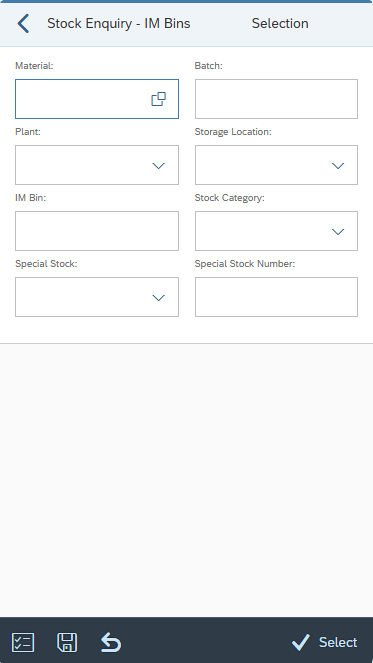
| Configuration element | Available structures/fields |
|---|---|
| SELECT_OPTS | MATERIAL or MATNR* – SAP material number BATCH or CHARG* – SAP batch number PLANT or WERKS* – plant STORE_LOC or LGORT* – storage location SPEC_STOCK or SP_STOCK – special stock type SPEC_STOCK_NUMBER or SP_STOCK_NO* - special stock number ST_BIN_IM - IM multi-bin number ST_STATUS or BESTQ* – stock category |
| SELECT_OPTS_ACTIONS | BACK - back to previous screen. CLEAR_INPUT -clear all input fields. VAR_CHOOSE – select saved variants. VAR_SAVE – save the selection entries as a variant. SELECT – proceed to next screen. |
| Configuration element | Available structures |
|---|---|
| LIST_QUANT_IM | Primary: /TCTM/IMB_LQUA (LQUA) Secondary: /TCTM/IMB_LAGP (LAGP), MAKT (MAKT), MARA (MARA), MARC (MARC, MARD (MARD) |
| LIST_QUANT_ACTIONS | BACK - back to previous screen. |
| LIST_QUANT_HEADER | Primary: /TCTM/IMB_LQUA (LQUA) Secondary: MAKT (MAKT), MARA (MARA), MARC (MARC, MARD (MARD), /TCTM/IMB_LAGP (LAGP) |
| LIST_QUANT_HEADER_EX | n/a |
| LIST_QUANT_SORT_IM | This can be left blank if all storage locations are "IM multi-bin" relevant. |
| LIST_QUANT_SORT_IMB | Primary: /TCTM/IMB_LQUA |
| Configuration element | Available structures |
|---|---|
| INPUT_QT_DETAIL_IM | Primary: /TCTM/IMB_LQUA (LQUA) Secondary: /TCTM/IMB_LAGP (LAGP), MAKT (MAKT), MARA (MARA), MARC (MARC, MARD (MARD) |
| INPUT_QT_ACTIONS_IM | BACK - back to previous screen. Actions to jump to General Posting can be added together with action class /TCTM/WM_APP_513_ACTIONS. The actions should be in the format GP_xxxx_yyy where GP is fixed for General Posting, xxxx is the appropriate configuration set and yyy is the (optional) movement type to be used. The jump app transaction needs to be included in this AMD section as well. |
| Configuration element | Available structures |
|---|---|
| FE_APP | Frontend class to use in running the transaction. Reference to the platform specific frontend application that should be used to run the transaction. Included in the App Master Data file supplied for setting up the initial transactions. |
| MATERIAL_SEARCH_SEQ | Defines the search sequence for materials and the relevant conversion exits. Valid Values: M – Material D – Description E – EAN code (the EAN code for any unit of measure in the material master) B – Storage Bin (Plant/Data Stor 1 view of material master) |
| ALLOW_NEG_STK_DISP | Allow display of negative stock. If toggle = ON, negative stock values are displayed in the quant list screen when a stock enquiry is performed. If toggle = OFF, negative quantities are not displayed, only zero quantities or greater. |
| ALLOW_IMB_STK_DISP | Allow display of IM multi-bin stock. If toggle = ON, the IM bin is displayed on the IM quant list screen and the IM quant details screen. If toggle = OFF, the IM bin is not displayed. |
| PLANT_FILTER | Enables filtering of plants assigned to the warehouse, allowing you to include or exclude specific values in the list view. |
| SLOC_FILTER | This is a possible filter element that can be used, as required, to allow filtering of the storage locations (if these need to be restricted to a subset of locations that are allocated to the PreBilt warehouse). It has been created as an example and can be used or changed as required. It must be used in conjunction with a suitable field class assigned to the field. |
| ST_TYPE_FILTER | Enables filtering of storage types assigned to the warehouse, allowing the user to include or exclude specific values in the list view. |
| APP_TEXTS | Defines standard app text to be used in screen headers, buttons etc. |
| TRANS_INFO | Information about the transaction. |