> For the complete documentation index, see [llms.txt](https://docs.theconfigteam.com/llms.txt). Markdown versions of documentation pages are available by appending `.md` to page URLs; this page is available as [Markdown](https://docs.theconfigteam.com/prebilt-ewm/user/games/competitions.md).

# Competitions

A Competition is defined as a game with multiple participants but a clear winner (with runners-up) within a set period.

{% hint style="info" %}
**Example**

A Competition is created to select the operator with the highest pick rate for the week.
{% endhint %}

A competition requires the assignment of:

* A Metric which defines what the competition will be evaluating.
* A Goal to which the winner will be judged by.
* The Timeframe during which the competition will run.
* The Participants of the competition who will be evaluated for a winner.

A winner of a Competition will be presented with a virtual Medal, which can have an associated reward if the game organiser chooses.

## Create a new competition

From the EWM warehouse monitor, double click on node `Games > Competitions` and click on **Execute** in the selection popup:

<figure><img src="https://1016750988-files.gitbook.io/~/files/v0/b/gitbook-x-prod.appspot.com/o/spaces%2F7lFTpSLijn44pippdL6u%2Fuploads%2Fgit-blob-3486935aed25fdb7b0a347e6105fb6dc30fad974%2Fimage%20(181).png?alt=media" alt=""><figcaption><p>Competition Node</p></figcaption></figure>

From the Competitions report toolbar, click on `More Methods > Create Competition`:

<figure><img src="https://1016750988-files.gitbook.io/~/files/v0/b/gitbook-x-prod.appspot.com/o/spaces%2F7lFTpSLijn44pippdL6u%2Fuploads%2Fgit-blob-a0904bd939d168e421712394df2d24fcee599066%2Fimage%20(182).png?alt=media" alt=""><figcaption></figcaption></figure>

Enter the following fields for the new competition and click on OK:

| **Field**               | **Use**                                                              |
| ----------------------- | -------------------------------------------------------------------- |
| Game Title              | Short game description                                               |
| Competition Description | Additional game description                                          |
| Game Metric             | Currently only WTCONF (confirmed warehouse tasks) is supported       |
| Medal Name              | Short medal name                                                     |
| Medal Description       | Long medal name                                                      |
| Reward Exists           | (Optional) Activate checkbox if a reward will be given to the winner |
| Reward Description      | (Optional) Reward description, if applicable                         |

<figure><img src="https://1016750988-files.gitbook.io/~/files/v0/b/gitbook-x-prod.appspot.com/o/spaces%2F7lFTpSLijn44pippdL6u%2Fuploads%2Fgit-blob-fa2a35034fc1c8634884a4a52260358053fa05cb%2Fimage%20(183).png?alt=media" alt=""><figcaption></figcaption></figure>

The competition is created with a new ID number and is displayed in the monitor. The initial status is PREPPING:

<figure><img src="https://1016750988-files.gitbook.io/~/files/v0/b/gitbook-x-prod.appspot.com/o/spaces%2F7lFTpSLijn44pippdL6u%2Fuploads%2Fgit-blob-aa593b821118b4cf6be7cf4404ee22163fa04e9b%2Fimage%20(186).png?alt=media" alt=""><figcaption></figcaption></figure>

### Configure the metric and goal

The Metric defines what the Competition will be evaluating, based on warehouse task attributes. The Goal defines the game objective. The first player to reach this goal will be the winner.

Highlight the Competition and click on the **Configure Metric** button:

<figure><img src="https://1016750988-files.gitbook.io/~/files/v0/b/gitbook-x-prod.appspot.com/o/spaces%2F7lFTpSLijn44pippdL6u%2Fuploads%2Fgit-blob-1043b937e7a3bb98e7ff306e981363a62b3d440a%2Fimage%20(187).png?alt=media" alt=""><figcaption></figcaption></figure>

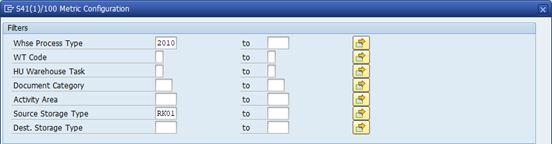
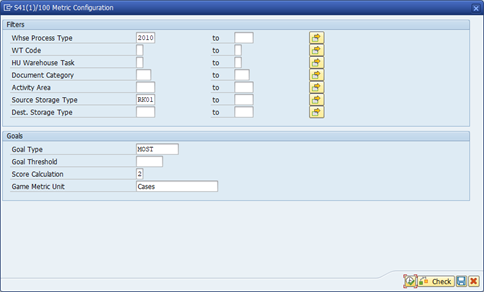
A popup is displayed to define the Metric filters and the Goal.

In the Metric filters, enter the warehouse task attributes that the system should track for the game.

{% hint style="info" %}
**Example**

The Competition is only focused on picking tasks (WPT 2010) where the source storage type is RK01.
{% endhint %}

<figure><img src="https://1016750988-files.gitbook.io/~/files/v0/b/gitbook-x-prod.appspot.com/o/spaces%2F7lFTpSLijn44pippdL6u%2Fuploads%2Fgit-blob-b054046148885c0c080ce6157de9d0c2afd1e82c%2FEWM-config%20metric%2002.png?alt=media" alt=""><figcaption></figcaption></figure>

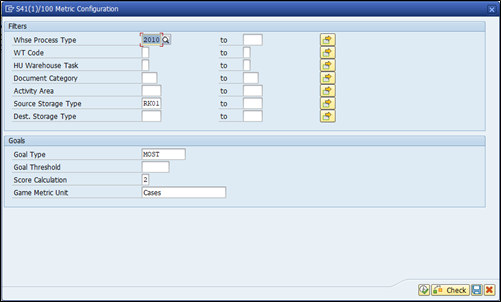
In the Goals section, enter the following fields:

<table data-header-hidden><thead><tr><th width="202">Field</th><th>Use</th></tr></thead><tbody><tr><td><strong>Field</strong></td><td><strong>Use</strong></td></tr><tr><td>Goal Type</td><td><p>Select how the goal is defined:</p><p>· MOST – Winner has highest score</p><p>· THRESHOLD – Winner reaches threshold first</p><p>· LEAST – Winner has lowest score</p></td></tr><tr><td>Goal Threshold</td><td>Only applicable if Goal Type = THRESHOLD.</td></tr><tr><td>Score Calculation</td><td><p>Defines how the system tracks scores:</p><p>· 1 – Each confirmed task is a score point</p><p>· 2 – Score points are based on confirmed quantity</p></td></tr><tr><td>Game Metric Unit</td><td>Free text to indicate the metric unit. This is displayed in scores in the warehouse monitor and the PreBilt app.</td></tr></tbody></table>

{% hint style="info" %}
**Example**

A Competition will give a prize to the winner with the highest score (Goal Type = MOST), will track score based on confirmed task quantity (Score Calculation = 2) and the Metric unit will be ‘Cases’ since you only pick full cases from RK01.
{% endhint %}

<figure><img src="https://1016750988-files.gitbook.io/~/files/v0/b/gitbook-x-prod.appspot.com/o/spaces%2F7lFTpSLijn44pippdL6u%2Fuploads%2Fgit-blob-b8b0fad4983a19bd3338a0b7a628fd1b8c24b863%2FEWM-config%20metric%2003.png?alt=media" alt=""><figcaption></figcaption></figure>

Click on the **Execute** button. The ‘Metric Ok?’ column is flagged:

<figure><img src="https://1016750988-files.gitbook.io/~/files/v0/b/gitbook-x-prod.appspot.com/o/spaces%2F7lFTpSLijn44pippdL6u%2Fuploads%2Fgit-blob-06785ea39d8522b88d7950b3fb82d7b60609585a%2Fimage%20(188).png?alt=media" alt=""><figcaption></figcaption></figure>

### Define the timeframe

Highlight the Competition and click on the **Add Timeframe** button:

<figure><img src="https://1016750988-files.gitbook.io/~/files/v0/b/gitbook-x-prod.appspot.com/o/spaces%2F7lFTpSLijn44pippdL6u%2Fuploads%2Fgit-blob-18060c0eb06d8fa7ac8add62665dfe359831f59a%2Fimage%20(189).png?alt=media" alt=""><figcaption></figcaption></figure>

Enter the start and end date/time for your Competition and click on **OK**. The start date/time must be in the future.

<figure><img src="https://1016750988-files.gitbook.io/~/files/v0/b/gitbook-x-prod.appspot.com/o/spaces%2F7lFTpSLijn44pippdL6u%2Fuploads%2Fgit-blob-252bd949421bd7073354384dce1aca5d29e1e804%2Fimage%20(190).png?alt=media" alt=""><figcaption></figcaption></figure>

The Competition Timeframe is updated:

<figure><img src="https://1016750988-files.gitbook.io/~/files/v0/b/gitbook-x-prod.appspot.com/o/spaces%2F7lFTpSLijn44pippdL6u%2Fuploads%2Fgit-blob-97064911d207078354282e8a714b802d0b43ee00%2Fimage%20(191).png?alt=media" alt=""><figcaption></figcaption></figure>

{% hint style="info" %}
**Note**

Multiple Timeframes can be added for a Competition, if required.
{% endhint %}

### Add participants

Highlight the Competition and click on the **Add Participant** button:

<figure><img src="https://1016750988-files.gitbook.io/~/files/v0/b/gitbook-x-prod.appspot.com/o/spaces%2F7lFTpSLijn44pippdL6u%2Fuploads%2Fgit-blob-9281eadbc974ab266dd27715d0db4401a9a46516%2Fimage%20(192).png?alt=media" alt=""><figcaption></figcaption></figure>

A popup is displayed to add Participants. Click on the **Multiple Selection** button to add multiple participants:

<figure><img src="https://1016750988-files.gitbook.io/~/files/v0/b/gitbook-x-prod.appspot.com/o/spaces%2F7lFTpSLijn44pippdL6u%2Fuploads%2Fgit-blob-ce03f82fd8d2851b015532885b1c0e612ce6ab48%2Fimage%20(194).png?alt=media" alt=""><figcaption></figcaption></figure>

Enter the username of all Participants and click on **Execute** twice:

<figure><img src="https://1016750988-files.gitbook.io/~/files/v0/b/gitbook-x-prod.appspot.com/o/spaces%2F7lFTpSLijn44pippdL6u%2Fuploads%2Fgit-blob-afabc1f94c51afcd6d251f9255b868dfa92cf8a3%2Fimage%20(193).png?alt=media" alt=""><figcaption></figcaption></figure>

The Participants can be displayed by clicking on the **Participants** button against the Competition:

<figure><img src="https://1016750988-files.gitbook.io/~/files/v0/b/gitbook-x-prod.appspot.com/o/spaces%2F7lFTpSLijn44pippdL6u%2Fuploads%2Fgit-blob-8c50b1ff73a30fdddb56124e5edb848f2546b3a6%2Fimage%20(195).png?alt=media" alt=""><figcaption></figcaption></figure>

### Start the competition

Once your Competition is fully defined (i.e. Metric, Timeframe, Participants), click on **Set to Ready** button to release it.

<figure><img src="https://1016750988-files.gitbook.io/~/files/v0/b/gitbook-x-prod.appspot.com/o/spaces%2F7lFTpSLijn44pippdL6u%2Fuploads%2Fgit-blob-337c906bcfc8df1d940a50107d2951232b9ea94f%2Fimage%20(196).png?alt=media" alt=""><figcaption></figcaption></figure>

The status changes to READY:

<figure><img src="https://1016750988-files.gitbook.io/~/files/v0/b/gitbook-x-prod.appspot.com/o/spaces%2F7lFTpSLijn44pippdL6u%2Fuploads%2Fgit-blob-54e3c1e155d53b6bc152a525389b3545e6c95b12%2Fimage%20(197).png?alt=media" alt=""><figcaption></figcaption></figure>

Once the Competition start time is reached, the status automatically changes to IN\_PROC and the system starts tracking scores for each Participant.

## Change competition

You can change the Competition header attributes by clicking on `More Methods > Change Competition`:

<figure><img src="https://1016750988-files.gitbook.io/~/files/v0/b/gitbook-x-prod.appspot.com/o/spaces%2F7lFTpSLijn44pippdL6u%2Fuploads%2Fgit-blob-47f9a41d970385a4c1455a12af0d463494abdac8%2Fimage%20(198).png?alt=media" alt=""><figcaption></figcaption></figure>

{% hint style="info" %}
**Note**

The Metric can only be changed if the status is PREPPING.
{% endhint %}

### Set to prepping

To change the Competition status back to PREPPING, click on `More Methods > Set to Prepping`:

<figure><img src="https://1016750988-files.gitbook.io/~/files/v0/b/gitbook-x-prod.appspot.com/o/spaces%2F7lFTpSLijn44pippdL6u%2Fuploads%2Fgit-blob-e56e0028cef5fd41706dd732eadaaf3e1f3fbdd8%2Fimage%20(199).png?alt=media" alt=""><figcaption></figcaption></figure>

### Change the metric

To change the Metric, first ensure the Competition status is set back to PREPPING. Then, click the **Configure Metric** button:

<figure><img src="https://1016750988-files.gitbook.io/~/files/v0/b/gitbook-x-prod.appspot.com/o/spaces%2F7lFTpSLijn44pippdL6u%2Fuploads%2Fgit-blob-8f93eef0da94a63edb150a212b9a7669046925db%2Fimage%20(200).png?alt=media" alt=""><figcaption></figcaption></figure>

Update the Metric as required and click on **Execute**:

<figure><img src="https://1016750988-files.gitbook.io/~/files/v0/b/gitbook-x-prod.appspot.com/o/spaces%2F7lFTpSLijn44pippdL6u%2Fuploads%2Fgit-blob-911279cb05d4513a9307c8eec49a0673d4905644%2FEWM-change%20metric%2002.png?alt=media" alt=""><figcaption></figcaption></figure>

### Change the timeframe

{% hint style="info" %}
To change or delete a Timeframe, first ensure the Competition status is set back to PREPPING.
{% endhint %}

Highlight the Competition and click the **Time Frames** button, then click on the **Change** or **Remove** buttons.

<figure><img src="https://1016750988-files.gitbook.io/~/files/v0/b/gitbook-x-prod.appspot.com/o/spaces%2F7lFTpSLijn44pippdL6u%2Fuploads%2Fgit-blob-b112e78369722be38d64ca6a3798e9dd6aaa6dbc%2Fimage%20(201).png?alt=media" alt=""><figcaption></figcaption></figure>

### Add or remove participants

To add a Participant, follow the same steps as described in [Add Participants](#add-participants).

To remove a Participant, first click on the **Participants** button, then highlight the required participant and click on the **Delete** button.

<figure><img src="https://1016750988-files.gitbook.io/~/files/v0/b/gitbook-x-prod.appspot.com/o/spaces%2F7lFTpSLijn44pippdL6u%2Fuploads%2Fgit-blob-c70cc5c83c68311b34ebd29ba2247c350a4c33a4%2Fimage%20(202).png?alt=media" alt=""><figcaption></figcaption></figure>

### Finish the competition manually

A Competition can be finished earlier if needed, by clicking on `More Methods > Set to Finish`. The status must be IN\_PROC (In Process).

<figure><img src="https://1016750988-files.gitbook.io/~/files/v0/b/gitbook-x-prod.appspot.com/o/spaces%2F7lFTpSLijn44pippdL6u%2Fuploads%2Fgit-blob-ccd5d03fae2bdd61f596218e9958e68ef5845095%2Fimage%20(204).png?alt=media" alt=""><figcaption></figcaption></figure>

## Delete the competition

{% embed url="<https://www.youtube.com/watch?v=0C6wlBm9TDY>" %}

A Competition in status PREPPING can be deleted by clicking on `More Methods > Delete Competition`:

<figure><img src="https://1016750988-files.gitbook.io/~/files/v0/b/gitbook-x-prod.appspot.com/o/spaces%2F7lFTpSLijn44pippdL6u%2Fuploads%2Fgit-blob-61e9664dfc5e9b0cb65763e829a2361db3091f05%2Fimage%20(203).png?alt=media" alt=""><figcaption></figcaption></figure>