> For the complete documentation index, see [llms.txt](https://docs.theconfigteam.com/llms.txt). Markdown versions of documentation pages are available by appending `.md` to page URLs; this page is available as [Markdown](https://docs.theconfigteam.com/prebilt-ewm/installation/prebilt-standalone-edition-installation/post-import-activities.md).
# Post-import activities
{% hint style="info" %}
**Note**
Configure Presentation Device and PreBilt Settings in each environment and client throughout the project.
{% endhint %}
## Setup the RF presentation device
In transaction */SCWM/PRDVC*, change to display mode and click 'New Entries'.
Fields should be entered as per your naming conventions and the [display profile previously created](/prebilt-ewm/installation/prebilt-standalone-edition-installation/backend-installation.md#create-a-display-profile). As an example:
{% hint style="info" %}
**Note**
FKeyQty matches the number of physical F-Keys you require, leave blank if you don’t not wish to display the Fkeys
{% endhint %}
## Configure PreBilt Settings
{% embed url="" %}
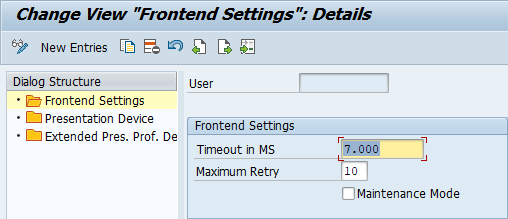
In the event of a connection drop, the number of attempts to regain connection can be configured via transaction */TCTM/EWM\_SETTINGS*, node 'Frontend Settings'. The timeout value is defined in milliseconds.
{% hint style="info" %}
**Example**
There will be up to 10 re-connection attempts every 7 seconds. User specific entries can be added in addition to the default if desired.
{% endhint %}