Manual Installation Steps

Configuration of monitor nodes

Note

Not all columns are visible in the tables below, any column not displayed does not need any value.

The configuration of the EWM warehouse monitor nodes can be accomplished by either activating the BC Set /TCTM/EWM_GAMIFICATION or by manually following the customisation steps outlined below.

Add EWM Gamification Metric Providers to table /TCTM/ESV_GAM_MP.

Game Metric

Metric Description

Class Name

WTCONF

Confirmed Tasks

/TCTM/EWM_SRV_GAME_METRIC_WTCO

Define nodes (define categories)

Extended Warehouse Management->Monitoring->Warehouse Management Monitor->Define Nodes>Define Categories

View: /SCWM/V_CATEGORY

Define Categories

Category

Text

Presentation Text

ZGAME

Games

Games

Define nodes (define object classes)

Extended Warehouse Management->Monitoring->Warehouse Management Monitor->Define Nodes>Define Object Classes

View: /SCWM/V_OBCLS

Define Object Classes

Object Class

Text

Presentation Text

ZGACHV

Achievements

Achievements

ZGCHAL

Gamification Challanges

Challanges

ZGCHLV

Gamification Challenge Level

Challange Level

ZGCHPA

Gamification Participants

Participants

ZGCHTI

Gamification Timeframe

Timeframes

ZGCOMP

Gamification Competition

Competitions

ZGCOPA

Gamification Participants

Participants

ZGCOTI

Gamification Timeframe

Timeframes

Define nodes (define node profiles)

Extended Warehouse Management->Monitoring->Warehouse Management Monitor->Define Nodes>Define Node Profiles

View: /SCWM/V_NODE_PRF

Define Node Profiles

Node Profile

Node Profile

List Table Type

List Function Module

Text

Presentation Text

Disable

Visibility

ZPGAN001

ZGCOMP

/TCTM/ESV_TT_GAME_COMPETITION

/TCTM/EWM_SRV_GAME_MONNO_COMP

Competitions

Competitions

Always Visible

ZPGAN002

ZGCOTI

/TCTM/ESV_TT_GAME_TIME_FRAME

/TCTM/EWM_SRV_GAME_MONNO_CO_TF

Time Frames

Time Frames

Always Visible

ZPGAN003

ZGCOPA

/TCTM/ESV_TT_GAME_PARTICIPATIO

/TCTM/EWM_SRV_GAME_MONNO_CO_PA

Participants

Participants

Always Visible

ZPGAN004

ZGCHAL

/TCTM/ESV_TT_GAME_CHALLENGE

/TCTM/EWM_SRV_GAME_MONNO_CHAL

Challenges

Challenges

Always Visible

ZPGAN005

ZGCHTI

/TCTM/ESV_TT_GAME_TIME_FRAME

/TCTM/EWM_SRV_GAME_MONNO_CH_TF

Time Frames

Time Frames

Always Visible

ZPGAN006

ZGCHPA

/TCTM/ESV_TT_GAME_PARTICIPATIO

/TCTM/EWM_SRV_GAME_MONNO_CH_PA

Participants

Participants

Always Visible

ZPGAN007

ZGCHLV

/TCTM/ESV_TT_GAME_CHAL_LEVEL

/TCTM/EWM_SRV_GAME_MONNO_CH_LV

Levels

Levels

Always Visible

ZPGAN008

ZGACHV

/TCTM/ESV_TT_GAME_ACHIEVEMENT

/TCTM/EWM_SRV_GAME_MONNO_ACHV

Achievements

Achievements

Always Visible

Define nodes (define nodes)

Extended Warehouse Management->Monitoring->Warehouse Management Monitor->Define Nodes>Define Nodes

View: /SCWM/V_NODE

Define Nodes

Node

Category

Node Profile

Text

Presentation Text

ZGA000001

ZGAME

Games

Games

ZGA000002

ZPGAN001

Competitions

Competitions

ZGA000003

ZPGAN002

Time Frames

Time Frames

ZGA000004

ZPGAN003

Participants

Participants

ZGA000005

ZPGAN004

Challenges

Challenges

ZGA000006

ZPGAN005

Time Frames

Time Frames

ZGA000007

ZPGAN006

Participants

Participants

ZGA000008

ZPGAN007

Levels

Levels

ZGA000009

ZPGAN008

Achievements

Achievements

Define object class methods

Extended Warehouse Management->Monitoring->Warehouse Management Monitor->Define Object Class Methods

View: /SCWM/V_METHOD

Define Object Class Methods

Object Class

Method

Method Function Module

Method Function Module

Auto Refresh

Visibility

Text

Presentation Text

Push Button text

ZGCHAL

ZGM001

/TCTM/EWM_SRV_GAME_MONAC_CH_CR

@17@

Always Visible

Create Challenge

Create

Create

ZGCHAL

ZGM002

/TCTM/EWM_SRV_GAME_MONAC_CH_UP

@0Z@

Always Visible

Change Challenge

Change

Change

ZGCHAL

ZGM003

/TCTM/EWM_SRV_GAME_MONAC_CH_SR

@5Y@

Always Visible

Set to Ready

Set to Ready

Set Rdy

ZGCHAL

ZGM004

/TCTM/EWM_SRV_GAME_MONAC_CH_SP

@4R@

Always Visible

Set to Prepping

Set to Prepping

Set Prep

ZGCHAL

ZGM005

/TCTM/EWM_SRV_GAME_MONAC_CH_SC

@DF@

Always Visible

Set to Closed

Set to Closed

Set Done

ZGCHAL

ZGM006

/TCTM/EWM_SRV_GAME_MONAC_CH_DE

@18@

Always Visible

Delete Challenge

Delete

Delete

ZGCHAL

ZGM007

/TCTM/EWM_SRV_GAME_MONAC_CH_PA

@KP@

Always Visible

Add Participant

Add Participant

Add Part

ZGCHAL

ZGM008

/TCTM/EWM_SRV_GAME_MONAC_CH_TC

@BH@

Always Visible

Add Timeframe

Add Timeframe

Add Time

ZGCHAL

ZGM009

/TCTM/EWM_SRV_GAME_MONAC_CH_LA

@NM@

Always Visible

Add Level

Add Level

Add Lvl

ZGCHAL

ZGM010

/TCTM/EWM_SRV_GAME_MONAC_CH_MC

@BX@

Always Visible

Configure Metric

Config Metric

Metric

ZGCHLV

ZGM001

/TCTM/EWM_SRV_GAME_MONAC_CH_LU

@0Z@

Always Visible

Change Level

Change

Change

ZGCHLV

ZGM002

/TCTM/EWM_SRV_GAME_MONAC_CH_LD

@18@

Always Visible

Remove Level

Remove

Remove

ZGCHLV

ZGM003

/TCTM/EWM_SRV_GAME_MONAC_CH_LG

@BX@

Always Visible

Configure Goal

Goal

Goal

ZGCHPA

ZGM001

/TCTM/EWM_SRV_GAME_MONAC_CH_PR

@18@

Always Visible

Remove Participant

Remove

Remove

ZGCHPA

ZGM002

/TCTM/EWM_SRV_GAME_MONAC_CH_PU

@0Z@

Always Visible

Change Participant

Change

Change

ZGCHTI

ZGM001

/TCTM/EWM_SRV_GAME_MONAC_CH_TU

@0Z@

Always Visible

Change Timeframe

Change

Change

ZGCHTI

ZGM002

/TCTM/EWM_SRV_GAME_MONAC_CH_TD

@18@

Always Visible

Remove Timeframe

Remove

Remove

ZGCOMP

ZGM001

/TCTM/EWM_SRV_GAME_MONAC_CO_CR

@17@

Always Visible

Create Competition

Create

Create

ZGCOMP

ZGM002

/TCTM/EWM_SRV_GAME_MONAC_CO_UP

@0Z@

Always Visible

Change Competition

Change

Change

ZGCOMP

ZGM003

/TCTM/EWM_SRV_GAME_MONAC_CO_SR

@5Y@

Always Visible

Set to Ready

Set to Ready

Set Rdy

ZGCOMP

ZGM004

/TCTM/EWM_SRV_GAME_MONAC_CO_SP

@4R@

Always Visible

Set to Prepping

Set to Prepping

Set Prep

ZGCOMP

ZGM005

/TCTM/EWM_SRV_GAME_MONAC_CO_SF

@DF@

Always Visible

Set to Finish

Set to Finish

Set Fin

ZGCOMP

ZGM006

/TCTM/EWM_SRV_GAME_MONAC_CO_DE

@18@

Always Visible

Delete Competition

Delete

Delete

ZGCOMP

ZGM007

/TCTM/EWM_SRV_GAME_MONAC_CO_PA

@KP@

Always Visible

Add Participant

Add Participant

Add Part

ZGCOMP

ZGM008

/TCTM/EWM_SRV_GAME_MONAC_CO_TC

@BH@

Always Visible

Add Timeframe

Add Timeframe

Add Time

ZGCOMP

ZGM009

/TCTM/EWM_SRV_GAME_MONAC_CO_MC

@BX@

Always Visible

Configure Metric

Config Metric

Metric

ZGCOPA

ZGM001

/TCTM/EWM_SRV_GAME_MONAC_CO_PR

@18@

Always Visible

Remove Participant

Remove

Remove

ZGCOTI

ZGM001

/TCTM/EWM_SRV_GAME_MONAC_CO_TU

@0Z@

Always Visible

Change Timeframe

Change

Change

ZGCOTI

ZGM002

/TCTM/EWM_SRV_GAME_MONAC_CO_TD

@18@

Always Visible

Remove Timeframe

Remove

Remove

Define methods presentation

Create the following entries (for the required warehouse/monitor combinations) inExtended Warehouse Management->Monitoring->Warehouse Management Monitor->Define Object Class Methods

View: /SCWM/V_OBCLS_MT

Define Methods Presentation

Object Class

Sequence

Method

Text

Method Presentation

ZGCHAL

1

ZGM001

Create Challenge

Accumulated methods menu button

ZGCHAL

2

ZGM002

Change Challenge

Accumulated methods menu button

ZGCHAL

3

ZGM006

Delete Challenge

Accumulated methods menu button

ZGCHAL

4

ZGM007

Add Participant

Normal pushbutton with icon

ZGCHAL

5

ZGM008

Add Timeframe

Normal pushbutton with icon

ZGCHAL

6

ZGM009

Add Level

Normal pushbutton with icon

ZGCHAL

7

ZGM010

Configure Metric

Normal pushbutton with icon

ZGCHAL

8

ZGM003

Set to Ready

Normal pushbutton with icon

ZGCHAL

9

ZGM004

Set to Prepping

Accumulated methods menu button

ZGCHAL

10

ZGM005

Set to Closed

Accumulated methods menu button

ZGCHLV

1

ZGM001

Change Level

Normal pushbutton with icon

ZGCHLV

2

ZGM002

Remove Level

Normal pushbutton with icon

ZGCHLV

3

ZGM003

Configure Goal

Normal pushbutton with icon

ZGCHPA

1

ZGM002

Change Participant

Normal pushbutton with icon

ZGCHPA

2

ZGM001

Remove Participant

Normal pushbutton with icon

ZGCHTI

1

ZGM001

Change Timeframe

Normal pushbutton with icon

ZGCHTI

2

ZGM002

Remove Timeframe

Normal pushbutton with icon

ZGCOMP

1

ZGM001

Create Competition

Accumulated methods menu button

ZGCOMP

2

ZGM002

Change Competition

Accumulated methods menu button

ZGCOMP

3

ZGM006

Delete Competition

Accumulated methods menu button

ZGCOMP

4

ZGM007

Add Participant

Normal pushbutton with icon

ZGCOMP

5

ZGM008

Add Timeframe

Normal pushbutton with icon

ZGCOMP

6

ZGM009

Configure Metric

Normal pushbutton with icon

ZGCOMP

7

ZGM003

Set to Ready

Normal pushbutton with icon

ZGCOMP

8

ZGM004

Set to Prepping

Accumulated methods menu button

ZGCOMP

9

ZGM005

Set to Finish

Accumulated methods menu button

ZGCOPA

1

ZGM001

Remove Participant

Normal pushbutton with icon

ZGCOTI

1

ZGM001

Change Timeframe

Normal pushbutton with icon

ZGCOTI

2

ZGM002

Remove Timeframe

Normal pushbutton with icon

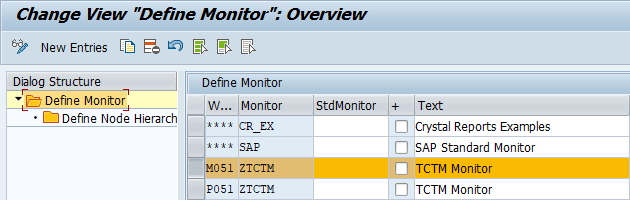
Define monitor

Extended Warehouse Management->Monitoring->Warehouse Management Monitor->Define Monitors

If a custom monitor is not available, the standard SAP monitor **** must be duplicated, then assigned to the warehouse.

View: /SCWM/V_MONITOR

Define Warehouse Monitor

Define node hierarchy

Extended Warehouse Management->Monitoring->Warehouse Management Monitor->Define Monitors->Define Node Hierarchy

Maintain the following node hierarchy for the monitor.

View: /SCWM/V_TREE

Define Node Hierarchy

Higher Node

Lower Node

Sequence

ROOT

ZGA000001

12

ZGA000001

ZGA000002

2

ZGA000001

ZGA000005

3

ZGA000001

ZGA000009

1

ZGA000002

ZGA000003

1

ZGA000002

ZGA000004

2

ZGA000005

ZGA000006

1

ZGA000005

ZGA000007

2

ZGA000005

ZGA000008

3

Add the newly created nodes to the Monitor Tree with T Code /SCWM/MON_MAINT.

Open relevant monitor(s) on the right side of the screen.

Display all monitor nodes on the left side of the screen (Node Pool > Display All Nodes).

Open the Customer Categories Node, then drag and drop ZGA000001 from the left side of the screen to the highest level of the monitor on the right-hand side of the screen.

Open Customer Node, then drag and drop ZGA000002, ZGA000009 & ZGA000005 onto the newly created Games node.

Place the highest-level Games node in a suitable position in the Monitor tree (under Tools suggested). This is open to customer preference. The result should look something like below.

Maintain Monitor Tree

Last updated

Was this helpful?